
nTilia is an offline Markdown editor (PWA) built for field journalism, research and humanitarian missions: Mission folders, AES-256-GCM vault on the device, local Whisper transcription, bilingual public journal FR ↔ EN.
Against Obsidian and PKM note apps, nTilia is not a second brain or a plugin graph: it is a Markdown alternative for capturing, encrypting and publishing fieldwork — where the network disappears.
AWAKEN DESTINY is a Belgian private foundation that funds and supports projects carried out in Cameroon by AWAKEN DESTINY, an independent Cameroonian association registered in Yaoundé. nTilia is a SamionX product: it lives in support of the foundation; it is not funded by donations.
Quick answer: nTilia or Obsidian?
Obsidian: personal knowledge management (PKM), linked notes, graph, deep customisation via thousands of plugins. Ideal at the desk for a “second brain”.
nTilia: offline-first field capture — Mission folders, on-device transcription, private GPS map, vault on the device, bilingual journal with AI that you approve. Ideal when the network drops and an interview must not end as an orphan file.
Both respect open Markdown. It is not the same job. Plugins, graph, lifelong personal wiki → Obsidian. Writing on assignment off-network → nTilia.
Why a “field” Markdown editor
In the field, writing does not look like desk work. A visit, a dictation between actions, a photo, a place, a timezone. The network is not a right: it drops, returns, or is missing when you need it.
Yet most writing and transcription tools — Notion, Google Docs, cloud apps, and many AI workflows — assume the opposite: a connection, a remote account, audio sent to a server, sometimes a closed format. For an association, a journalist, a researcher or a freelance on mission, that is not a comfort detail. It is memory that drifts, sources that leave the device, notes you may not open in ten years.
nTilia was built for that use: capture here, encrypt here, transcribe here — and publish only what the author decides, article by article.
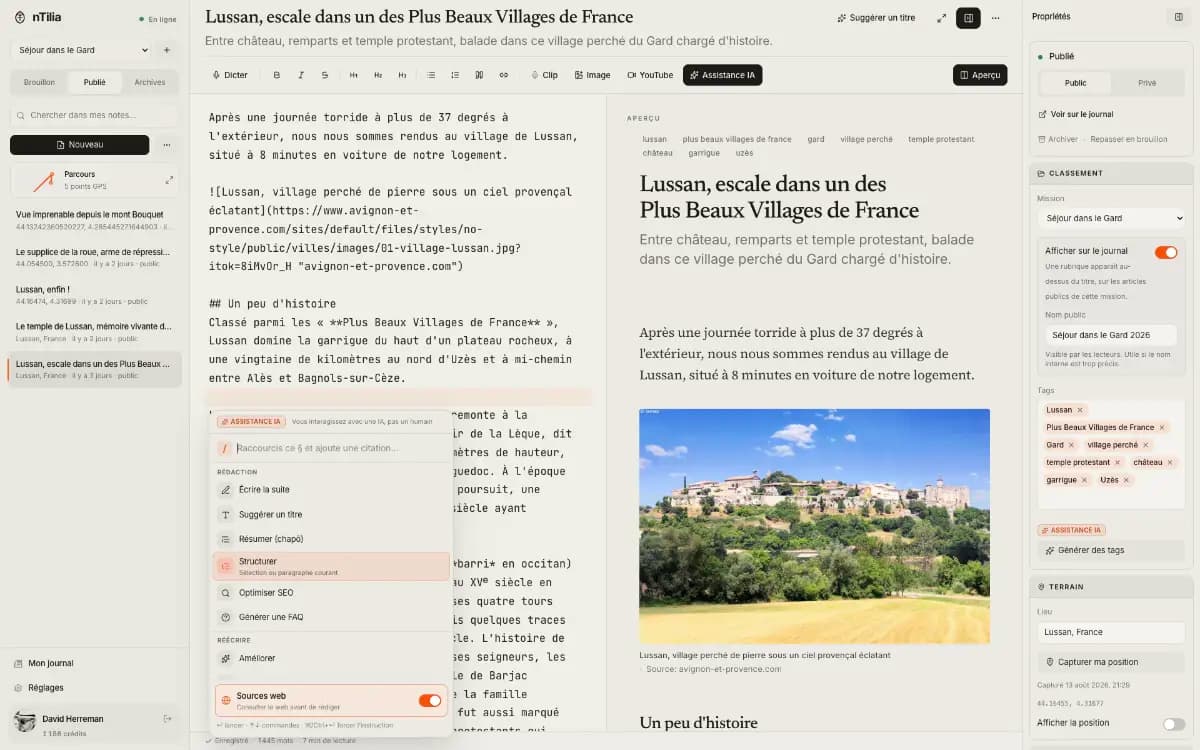
nTilia — field Markdown editor (PWA), usable in the browser
SamionX · nTilia
Who it is for: journalists, researchers, missions, freelancers
nTilia is for people who write away from the desk — or who must be able to.
Profiles the tool was designed for
- Journalists and freelancers — reporting, interviews, audio/photo takes, return to the newsroom with an exportable folder.
- Field researchers — offline readings, abstract and co-authors (ORCID), Zotero citekeys, Zenodo DOI path.
- Mission teams (humanitarian, associations) — one notebook per trip, without replacing a CRM or a full newsroom.
- Bilingual independents — one article, two linked FR ↔ EN versions, publish only after review.
Open Markdown: you leave with your files
The format is not proprietary. You import .md files, you export a ZIP (Markdown notes, audio, Mission metadata). You leave whenever you want, with everything.
That is the same open base as Obsidian, iA Writer or Typora — the difference is not the Markdown dialect, it is when the tool must win: on the road, not only at the desk.
Full feature catalogue: ntilia.com/en/features.
Missions: one folder per trip, not a pile of files
Five days in Maroua. A portrait in Brussels. Without a container, everything mixes. With a Mission, the trip has an envelope: notes, audio, photos, private map, export. Nothing else.
You create the Mission before departure (name, place, timezone). New notes land there. Existing notes stay in “Unassigned” — nothing is filed for you.
Notes with GPS land on a private map. The public journal does not see it. Before you lose the network, Prepare to leave runs sync + ZIP on this device — for an outage, not for a checkpoint.
- One folder per trip — name, place, timezone; new notes attach to it.
- Unassigned stays intact — your existing notes remain aside.
- Export this mission — ZIP notes + audio + metadata, on this device only.
- Route map — private GPS; distinct from the public journal.
Offline, vault and confidentiality
Capture, dictation, takes and editing work with no network. Transcription can run on the device (local Whisper): audio does not have to leave the phone to be transcribed.
By default, everything stays on the device. Notes marked “device” never sync. With the vault on: notes, takes and missions are encrypted at rest (AES-256-GCM, key derived with PBKDF2) in IndexedDB.
Once signed in: notes and takes leave privately only when nTilia is open, the vault unlocked, and a network is present — not from a locked pocket. Once synced, nTilia can read them for sync and the journal. Publishing remains a choice, article by article.
From Pro: safe recipient (end-to-end encrypted snapshot for a newsroom / desk), Travel Mode, Empty / Burn everything. Limit stated clearly: nTilia is not the whole phone, and IndexedDB is not a forensic wipe.
Useful security gestures
- “Device” notes — never synced.
- Vault — encryption at rest on the device.
- Safe recipient (Pro) — off-body copy; Burn everything does not touch that drop.
- Reimport .ntilia — recovery after burn or evacuation, independent of plan.
- Third-party tokens (Zenodo, WordPress, Ghost…) — sealed server-side, never returned to the UI.
Bilingual public journal, citable and correctable
When the network returns, you refine and, if you decide, you publish. The nTilia journal is designed as a source of truth: sober, bilingual FR ↔ EN, syndicable to WordPress or Ghost (from Pro).
Each article exposes a Cite block: APA, Chicago, BibTeX, RIS, JATS — one-click copy. The DOI, when it exists, replaces the URL in the formats.
Each “Update” archives the snapshot that was live. Readers browse the chain, compare, and you can republish an earlier version; a correction note appears under the date. Search-engine indexing (NewsArticle, IndexNow, news sitemap) is reserved for Pro.
Research path: Zotero, ORCID, Zenodo DOI
For ecology, public health, social sciences: readings offline, abstract and co-authors declared in frontmatter (name, ORCID, affiliation, role), Academic style (serif, framed abstract, numbered figures/tables, margin notes, preprint PDF).
While writing: local Better CSL JSON / BibTeX bibliography and [@citekey] autocomplete — private sources, nothing sent to the cloud to cite. On publish: RIS, JATS, Highwire tags, ScholarlyArticle JSON-LD.
From Pro: one-click Zenodo deposit (PDF + Markdown source, CC licence) — the DOI returns under Cite and into APA, BibTeX, RIS, JATS and JSON-LD. nTilia replaces neither the journal nor the institutional repository: it makes the notebook citable.
The Research profile (Settings → Journal) renames missions to projects, suggests Academic style and shows the AI mention as soon as a passage was generated.
Editing AI, not a chatbot that rewrites the mission
In the editor, type /: spelling, translation, personal voice, publish checklist, tones (journalist / field, donor update, team brief…), sources, FAQ. Every proposal goes through Before / After. Nothing is applied without explicit Accept.
The free plan includes weekly AI credits; every action is triggered by you, never in the background. Generative writing (continue, SEO, article translation) and local Whisper unlock from Pro. Pro+ adds sourced web search and a background dossier (place context — for you, not injected into the note).
What changes by plan
Free is enough to write, capture, encrypt and publish a citable journal. Pro unlocks news indexing, CMS syndication, safe recipient, local Whisper and volume. Pro+ adds custom domain, background dossier, sourced web search and more credits. Teams use the Newsroom offer, on quote.
Reference table (excerpt) — full detail on the features page.
| Capability | Free | Pro | Pro+ |
|---|---|---|---|
| Markdown editor + preview, glossary, history / diff | Yes | Yes | Yes |
| Offline / PWA / deferred sync, Missions + ZIP | Yes | Yes | Yes |
| AES-256-GCM vault, device notes | Yes | Yes | Yes |
| Safe recipient, Travel Mode | No | Yes | Yes |
| Journal, Cite, ORCID co-authors, published versions | Yes | Yes | Yes |
| Indexed journal, WordPress / Ghost, Zenodo DOI | No | Yes | Yes |
| Custom domain, background dossier, web search | No | No | Yes |
| Local Whisper, generative writing | No | Yes | Yes |
nTilia vs Obsidian: same format, different moment
Obsidian is a powerful Markdown PKM. nTilia is an offline-first notebook for field missions. Comparing the two makes sense for SEO and tool choice — provided we do not promise “better ranking” or claim to replace Obsidian’s graph.
Obsidian wins at the desk: backlinks, graph, Canvas, plugins. nTilia wins on the road: Mission, offline dictation, photo at the market, private GPS map, Prepare to leave, sync only with vault unlocked.
“I can’t find my 2023 note” → Obsidian. “I’m in Maroua, no network, the interview must not end as an orphan file” → nTilia.
Where Obsidian remains better
- Second brain, graph, daily notes as a life system.
- Plugin ecosystem (Dataview, Excalidraw, etc.).
- Team vault / workplace controls on Obsidian’s roadmap.
- Little need for “mission” capture (audio + photo + place + trip export).
| Criterion | nTilia | Obsidian |
|---|---|---|
| Job | Capture and publish the field | Think, link, organise knowledge |
| Typical users | Journalists, researchers, NGOs/missions, freelancers | Authors, students, developers, PKM practitioners |
| Files | Open Markdown (+ mission media) | Open Markdown in a vault |
| Offline | Built to capture without a network; Whisper on device | Excellent offline read/edit; PKM logic |
| Structure | Mission = one folder per trip | Folders, links, graph, plugins, Bases |
| Media | Photos & audio as takes; GPS on notes | Via plugins / external files |
| AI | / actions; Before/After; nothing without Accept | Via community plugins |
| Publish | Bilingual journal FR ↔ EN, versions | Obsidian Publish (paid option) |
| Research | Abstract, ORCID, cite formats, Zenodo DOI (Pro) | Plugins / external tools |
| Sensitive field | Travel Mode, Prepare to leave, device-only notes | Local-first; security depends on setup |
| Extension | Focused product surface | Thousands of plugins |
| Metaphor | Field notebook → desk → journal | Personal Wikipedia |
Other Markdown editors: where nTilia sits
Searches for “Obsidian alternative”, “offline Markdown editor” or “Markdown for journalists” often cross iA Writer, Typora, Bear, Craft, Notion or Logseq. Here is an honest reading, without a marketing scorecard.
- iA Writer / Typora — polished Markdown, often excellent offline; little or no bilingual public journal + Missions + local Whisper + DOI path.
- Notion — collaboration and databases; cloud-first, less portable for an encrypted mission notebook on the device.
- Logseq / other outliners — close to Obsidian on PKM; not the same focus on GPS capture / Mission export / safe recipient.
- Cloud “notes + AI” apps — often transcription and drafts on a server first; nTilia flips that flow.
SEO FAQ: common questions
The answers below follow nTilia’s public product framing — also useful for search engines and assistants that summarise a page.
- Is nTilia an Obsidian alternative? Only in the narrow sense: both edit local-first Markdown. For PKM and plugins, Obsidian remains the reference. nTilia is an alternative to generic note apps for the field, not a graph clone.
- Can I import an Obsidian vault? .md files, yes. Missions, takes, journal: native to nTilia — not a 1:1 migration.
- Is there a graph? No.
- Is the file format proprietary? No. Import .md, export ZIP.
- Does offline really work? Yes for capture, dictation, takes and editing. Sending a photo already attached to an article, and cloud AI, need a connection.
- How do I try it? Open the editor at ntilia.com — free, no credit card.
Link with AWAKEN DESTINY
In Ewondo, a language of Cameroon, Ntil means the writer. nTilia is a SamionX product (Belgium). It lives in support of the AWAKEN DESTINY foundation. It is not funded by donations.
100% of donations received are allocated to projects carried out in Cameroon. Only payment fees (Stripe) and bank charges are deducted by providers; the foundation takes no operating fee, its administrative costs being borne by the founders.
On the foundation site, the short story remains the news piece nTilia, a notebook for writing where the network stops. This publication is the detailed dossier — features, Obsidian comparison, plans — for those choosing a mission Markdown editor.
Sources and next steps
To decide, then write: the living catalogue of features and plans is on the product site.
- nTilia — home
- Features and plans
- Try: open the editor in the browser (installable PWA) — accept persistent storage so the local vault is not wiped
- Product support: [email protected]
In brief
- Open Markdown: import .md, export ZIP (notes, audio, metadata) — no proprietary format.
- Offline-first: capture, dictation, takes and editing without a network; Whisper can stay on the device.
- Mission = one folder per trip (notes, photos, audio, private GPS map, ZIP export on this device).
- AES-256-GCM vault; “device” notes never sync; Travel Mode / safe recipient from Pro.
- Bilingual journal FR ↔ EN, APA/Chicago/BibTeX/RIS/JATS citations; Zenodo DOI from Pro.
- Editing AI under control: Before/After proposals, nothing without explicit Accept.
- SamionX product supporting AWAKEN DESTINY — free trial at ntilia.com.